

GoldenSection Notes 4.0.1047
GoldenSection Notes helps to manage and organize all our Family Matters
Program info
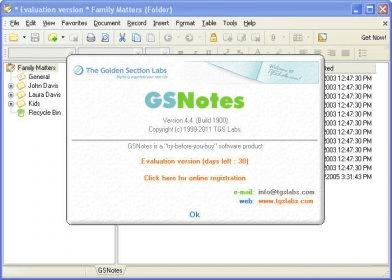
GoldenSection Notes 4.0 is the latest release of this shareware program developed by TGG Labs. They provide a free demo version available for downloading from their website. It will stop functioning after 30 days of its installation. From the Main Window, we can access several files and folders in a tree-like form configuration. There are Family Matters, General, and one folder for each member of the family, so all of them can access the program and write a diary, set reminder, to do lists, contacts, make tables, databases and lists with, books, DVD, Audio collections, birthday party photos, and many other topics of interest to our family. We can use the ready-made templates and adjust them to our needs. From the toolbar, we can access File, Edit, View, Document, Record, Insert, Format, Table, Tools, and Help. From the Icon Bar, we can directly open a file, save, delete, print, preview and search, crop, and many more. We can drag/drop any text and hyperlink from one application into Note. Files can be password protected, once we introduce the password we can access all the documents within that file. We can edit documents, change their font, font size, font color and backgrounds color. From the user interface, we can select between all these languages: English, Spanish, Russian, Romanian, German, French, Hungarian, Slovenian, Bulgarian, Greek, Czech, Italian, Catalan, Ukrainian, Portuguese, French, Brazilian Portuguese, Simplified Chinese, Traditional Chinese, Byelorussian, Serbian, Danish, Turkish, Dutch, Latvian, Croatian, Finnish, Swedish, Polish, Slovak, Lithuanian, Korean, and Norwegian.
Pros
- Free Demo for 30 days
- Available in many different languages
Cons
- None
Details
Extensions

No information available
The data will be available later.Old versions

No information available
The data will be available later.Awards

Related software

Cross-platform and easy-to-use desktop sticky notes utility.

Organize and manage all your notes in a tree structure with icons.

Stick e-notes on your screen.
Related stories
See all
A clear guide to the best free AI tools and free AI apps worth installing in 2026, with real use cases, free-plan limits, and honest picks for writing,coding, design, and local AI.

Learn how a WhatsApp Business AI agent works in 2026, how to set up Meta Business Agent, and how small teams can use WhatsApp AI for sales, support, and bookings.

Figma is growing from UI design software into a wider product platform. Here is how Figma Make, Sites, Buzz, Draw, Motion, and AI agents are changing product work in 2026.


Comments